Sunday, November 10, 2013

Sharepoint 3.0 , Search not working

One of our sharepoint 3.0 which comes with the Project server has a search problem, some users cannot search at all . After testing at UAT we find that to resolve it need to run the sharepoint update (infrastructureupdateforwindowssharepointservices3.0-kb951695-fullfile-x86)

This is how we do it,

Backup the sharepoint using stadm
Run the Sharepoint Update ( at this point we have the error that it cannot upgrade due to the the The B2B upgrader timer job failed ) which is at the steps 8.

To resolve this we follow the link here http://blog.mediawhole.com/2009/05/sharepoint-sp2-upgrade-fails-b2b.html , at this part

Here is what I did:

I copied web.config file from 12\CONFIG to 12\TEMPLATE\LAYOUTS.

The I did run:
psconfig -cmd upgrade -inplace b2b -force -wait

That's it.
After this, we manage to upgrade we find that the search is working fine. But then we have the exception error in SQL server 2005
the mssql dump looks like due from sharepoint search sql


From the sql server logs,
SqlDumpExceptionHandler: Process 71 generated fatal exception c0000005 EXCEPTION_ACCESS_VIOLATION

SQLDUMPER_UNKNOWN_APP.EXE, ValidateModule: Potential image problem at 0x77E64841: read 0xE9 instead of 0x8B (module C:\WINDOWS\system32\kernel32.dll)

From the sharepoint logs,
CSqlCrawl::ExecuteCommand fails Error 0x80004005 - File:d:\office\source\search\search\gather\server\gathersql.cxx Line:408


Based on the error , suspect due to the SQL Server 2005. We upgrade it to SP4 and the issue resolve perfectly.

Tuesday, January 03, 2012

Linux, finding out the hidden process that is using the port

Follow this link, http://tldp.org/HOWTO/Security-Quickstart-HOWTO/appendix.html

netstat -tapn

Active Internet connections (servers and established)

Local Address Foreign Address State PID/Program name
*:printer *:* LISTEN 988/inetd
bigcat:8000 *:* LISTEN 1064/junkbuster
*:time *:* LISTEN 988/inetd
*:x11 *:* LISTEN 1462/X
*:http *:* LISTEN 1078/httpd
bigcat:domain *:* LISTEN 956/named
*:ssh *:* LISTEN 972/sshd
*:631 *:* LISTEN 1315/cupsd
*:smtp *:* LISTEN 1051/master


which will be able to show the process

Sunday, July 17, 2011

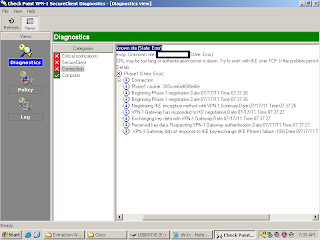
Windows 7, 32bit/64bit running Virtual Box and VPN

If you're using a virtual Machine under virtual box and using the software cisco checkpoint VPN-
1 Secure Client NGX R60 to connect to your office vpn
1. First you need to setup your VM network connection as bridge connection.
2. If facing problem in the phase 1 of the vpn connection while defining your site you can do this. From another PC with good working VPN connection, export out the registry including subfolder
HKLM\Software\checkpoint\SecureRemote\5.0\sites
then shutdown the good vpn client services. After that copy the folder C:\Program files\CheckPoint\SecureRemote\database
Then , in the VM while shutting down the vpn client services register the reg that you copy from the good PC and also replace the original database folder in the VM
After that restart back the secureremote services. The site now exists for you to run.

Tuesday, January 04, 2011

Resolving ORA-24005 Queue error ,when dropping a schema or a table

Follow this link,

http://decipherinfosys.wordpress.com/2007/05/16/resolving-ora-24005-when-dropping-a-schema-or-a-table/


SQL> execute DBMS_AQADM.DROP_QUEUE_TABLE (queue_table => ‘DECIPHER_AQ_DEMO’, force => true);


Same can be used on getting ORA-24005 while dropping table

Sunday, November 28, 2010

Resolving tempdb log file is full in SQL2000

In SQL 2000, if you have the error,

"The log file for database 'tempdb' is full. Back up the transaction log for the database to free up some log space."

To resolve this you need to truncate the log file by using

dump log tempdb with truncate_only

the normal backup log command won't work in this case

Wednesday, September 29, 2010

Logical Standby with Apply Process Fails With ORA-308

Recently, we encounter the Logical Standby Apply Process Fails With ORA-308 while testing the logical standby. Due to the archive log in Logical is automatically delete after a while.

To solve it, we first stop the automatically delete archivelog
exec dbms_logstdby.apply_set('LOG_AUTO_DELETE', 'FALSE');


Then, We check the ASM diskspace for the archivelog that is needed by standby.
Then we copy the archive log to the local folder for transfering it to standby by issuing below . The FLASH_DIR and EXPORT_DUMP_DIR is oracle directory, FLASH_DIR is the ASM disk space like +FLASHGRP/TESTDB/archivelog/

dbms_file_Transfer.copy_file('FLASH_DIR','1_3470_694714878.dbf','EXPORT_DUMP_DIR','1_3470_694714878.dbf');


After copying the file to standby, then we need to register the archivelog using below method.

Register the log file in standby

SQL> alter database register logfile '/TESTDB/archive/1_3470_694714878.dbf';

alter database register logfile '/TESTDB/archive/1_3470_694714878.dbf'

*

ERROR at line 1:

ORA-01289: cannot add duplicate logfile


If failed , then we have to update the logmnr table manually,

Stopped the logical standby.


SQL> alter database stop logical standby apply;

SQL> select file_name from system.logmnr_log$ where sequence#=3470;

FILE_NAME

------------------------------------------------------------------------------------------------------------------------------------------------------

+FLASHGRP/testdb/archivelog/2010_09_22/thread_1_seq_3470.3572.730402825

SQL> UPDATE SYSTEM.LOGMNR_LOG$ SET

FILE_NAME= 2 '/TESTDB/archive/1_3470_694714878.dbf' where sequence#=3470;

1 row updated.

SQL> commit;

Commit complete.


SQL> alter database start logical standby apply;

Database altered.


References:-
Logical Standby Apply Process Fails With ORA-308 [ID 274676.1]

Thursday, September 16, 2010

Oracle Error : ORA-21779 duration not active

Recently we encounter the error ORA-21779 duration not active, in the alert log. This error keeps repeating.

ORA-21779: duration not active
Cause: User is trying to use a duration that has been terminated.
Action: User should avoid performing such operation.


In the trace file , you will notice the below.

Errors in file ora_smon_610346.trc:
ORA-21779: duration not active
Fri Sep 17 14:25:54 2010


There are few problem that cause this, in below url show other issues. In our case this error keep repeating after few seconds. To solve this we do this.

After flushing the share pool , the error is no longer appeared

alter system flush shared_pool;

References:-

http://oraclequirks.blogspot.com/2006/07/ora-21779-brain-teaser.html

Friday, August 27, 2010

Oracle Listener on windows failed with faulting module oran110.dll

Recently we encounter the failing of listener, in our oracle XE , the error is due to a bug in the oracle. which is fixed in •9.2.0.8 Patch 1 ,•10.2.0.2 Patch 6 onwards , •10.2.0.3 Patch 2 onwards .

To workaround this issue,

in the Services, set the oracle listener to auto restart after few minutes if it encounter the failing of this services.

Metalink note:-
Windows TNS Listener Crash with Faulting Module ORANL10.DLL / ORANL9.DLL [ID 388017.1]


Event Viewer,
Faulting application TNSLSNR.EXE, version 0.0.0.0, faulting module oranl10.dll, version 10.2.0.1, fault address 0x000227ed.

For more information, see Help and Support Center at http://go.microsoft.com/fwlink/events.asp.

Monday, August 16, 2010

Oracle IAS 10.1.3 how to change oc4jadmin password

If you encounter the below error, please follow the link below to solve the problem.
javascript:void(0)
Unable to make a connection to OC4J instance instance_name on Application
Server application_server_name. A common cause for this failure is an
authentication error. The administrator password for each OC4J instance in the
Cluster must be the same as the administrator password for the OC4J instance on
which Application Server Control is running.


http://oraclefunda.wordpress.com/2008/05/16/how-to-change-oc4jadmin-password-for-application-server-10gr3/

Tuesday, July 13, 2010

Unwrapping Oracle PLSQL

To unwrap the oracle 10g and 11g source code , you can see the blog below with the source code to do that.

http://blog.teusink.net/2010/04/unwrapping-oracle-plsql-with-unwrappy.html
=== Oracle 10g/11g PL/SQL unwrapper - by Niels Teusink - blog.teusink.net ===

If you dont' have the perl then can use this website that provide the unwrap

http://hz.codecheck.ch/UnwrapIt/Unwrapped.jsp


Requirement: -
Python 2.6 from http://www.python.org/

Friday, May 21, 2010

SAP - brbackup BR0301E logon denied

If you encounter SAP error while trying to use SAP brbackup as below

./brbackup -t online -p initERD_online.sap

BR0055I Start of database backup: bedgvjjf.and 2010-05-21 14.48.27
BR0484I BRBACKUP log file: /oracle/ERD/sapbackup/bedgvjjf.and
BR0280I BRBACKUP time stamp: 2010-05-21 14.48.27
BR0301E SQL error -1017 at location BrDbConnect-2, SQL statement:
'CONNECT system/*******'
ORA-01017: invalid username/password; logon denied
BR0310E Connect to database instance ERD failed
BR0280I BRBACKUP time stamp: 2010-05-21 14.48.27

The error is due to the you need to put this "-u /" login as local user

./brbackup -u / -t online -p initERD_online.sap

Thursday, April 22, 2010

SQL Server 2000 - Implement Password Policy

Password composition & Minimum password length
No SQL Server 2000 policy/settings can be set to enable this minimum password length for sql server login,
Workaround :- Set a new sp_password_neww to implement the feature or replace the existing sp_password procedure. (If Upgrading the SQL Server 2000, the original sp_password have to be put back) .

For creating a new sp_password_new and sp_addlogin_new
To make sure that the old procedures are not used, revoke execute permissions for both the SP_ADDLOGIN stored procedure and for the SP_PASSWORD stored procedure.Important :- The sa must not use Enterprise Manager, or use any other application that uses menu-driven methods for adding logins.

e.g.
add the below for the sp_addlogin
if @passwd is NULL
begin
Raiserror 20010 'The new password can not be blank/NULL.'
return (1)
end

if len(@passwd) < 6
begin
Raiserror 20020 'The new password can not be less than 6 characters.'
return (1)
end

if not (@passwd like '%[0-9]%' and @passwd like '%[a-z]%')
begin
Raiserror 20020 'The new password must be alphanumeric.'
return (1)
end


Number of unsuccessful logons before lockout & Lockout duration
Unable to implement this on SQL 2000, since we're using sql server login and this feature are not availaible in Microsoft SQL 2000 it is only if we used Windows integrated login that it can be implemented. SQL 2000 don't have the "Alter Login ...." command
Info :http://www.sqlservercentral.com/Forums/Topic767023-146-1.aspx


How to implement password expiration dates for SQL Server 2000 or SQL Server 7.0 login IDs.
http://support.microsoft.com/kb/80397

Sunday, April 11, 2010

Oracle Forms Report Crash while generating Excel output, REP-56049

If you have encounter the error REP-56048: Engine rwENG-1 Crashed , job id: 39021, then you need to increase the memory settings of the reports.

to do this, in the $ORACLE_HOME/reports/config ,find your report config file
and change the engine id,

engine id="rwEng" class="oracle.reports.engine.EngineImpl" initengine="1" maxengine="1" minengine="0" englife="1" maxidle="30" callbacktimeout="90000" jvmoptions="-Xms64m -Xmx32m -Xss8192k -Xoss8192k"

with jvmOptions to a higher value e.g.

engine id="rwEng" class="oracle.reports.engine.EngineImpl" initengine="1" maxengine="1" minengine="0" englife="1" maxidle="30" callbacktimeout="90000" jvmoptions="-Xms512m -Xmx1024m -Xss8192k -Xoss8192k"


Restart the forms services after this.

If you still encounter this problem after increasing the memory and you oracle forms version is 10.1.2.0.2. Do the below,

1. Apply the latest patch set 10.1.2.3 and then apply the 6835690 patch 6835690 to run the report with enhancedspreadsheet. Download and apply the Patch:5983622 for 10.1.2.3.

Note: The one-off patch:6835690 to get EnhancedSpreadsheet can be applied on release 10.1.2.2 too, but it is always recommended to upgrade to the latest patchset available. Right now the latest one is patchset 3.

3. To make sure the middle tier was successfully upgraded to patchset 3 (10.1.2.3), execute the following url and command:
http://host:port/reports/rwservlet/getserverinfo?

$ORACLE_HOME/Apache/Apache/bin/httpd -version

Both versions, Oracle HTTP Server (OHS) and Oracle Reports should be 10.1.2.3

4. Apply one-off patch 6835690 needed to work with EnhancedSpreadsheet desformat.


After that , change the format to DESFORMAT=ENHANCEDSPREADSHEET has been introduced to generate large data sets (up to 75,000 rows) to spreadsheets as indicated patch:6835690

Friday, March 26, 2010

Upgrading Oracle 10gR2 to Oracle 11gR2

Recently we upgrade our linux oracle 10gr2, 10.2.0.4 to the Oracle 11Gr2.
Using the DBUA , below are the errors we encounter :-

1) Error ignored: ORA-00044: timed_statistics must be TRUE when statistics_level
is not BASIC. ORA-01078: failure in processing system parameters

When we check our oracle 10gr2 parameter , we set the timed_statistics=false. To resolve this we turn it back to TRUE


2) Another error, oracle 11g unable to access our audit file dest, audit_file_dest. This is due to we're using another different id and group to install the oracle 11g. To resolve this we change the folder permission to world writable.


3) ORA-04023: Object SYS.STANDARD could not be validated or authorized.

To resolve this we try ,
1) Starts back the oracle 10gr2 , then run the below but still not working.
@?/rdbms/admin/catalog
@?/rdbms/admin/catproc
@?/rdbms/admin/utlrp

2) Follow metalink note, Upgrading to 11.1.0 and DBUA reports ORA-4023 On SYS.STANDARD [ID 729909.1] but still doesn't work.

3) In the end , we do the manually upgrading process. Complete Checklist for Manual Upgrades to 11gR2 [ID 837570.1]
which seems don't have any problem.


References: -
Upgrade 11g, ORA-04023: Object SYS.STANDARD errors
http://www.oracle-base.com/forums/viewtopic.php?f=1&t=9888
Upgrading 11g
http://avdeo.com/2007/09/07/upgrading-to-oracle-database-11g/

Monday, December 28, 2009

Oracle Wallet Manager(OWM) :Exception in thread "main" java.lang.UnsatisfiedLinkError: owm2

Recently, we encounter the error as below in the Oracle Wallet Manager,

Exception in thread "main" java.lang.UnsatisfiedLinkError: owm2 (No such file or directory)
at java.lang.ClassLoader.loadLibraryWithPath(ClassLoader.java:993)
at java.lang.ClassLoader.loadLibraryWithClassLoader(ClassLoader.java:962)
at java.lang.System.loadLibrary(System.java:465)
at oracle.security.wallet.NZNative.(NZNative)
at java.lang.J9VMInternals.initializeImpl(Native Method)
at java.lang.J9VMInternals.initialize(J9VMInternals.java:200)
at oracle.security.admin.wltmgr.owma.OwmaApp.init(OwmaApp)
at oracle.sysman.emSDK.client.appContainer.WebApplication.launch(WebApplication.java:3446)
at oracle.sysman.emSDK.client.appContainer.WebApplication.main(WebApplication.java:3327)

To try to fix this error, we try to set the path for LD_LIBRARY_PATH to $ORACLE_HOME/lib but still the error persists. In the end , we found out that the error is due to the JDK , which we have upgrade from the existing 1.5 JDK to 1.6 JDK 64bit.

To fix it, we change the path in the file $ORACLE_HOME/bin/owm
JRE_HOME=/ApplTop/ias10gr2/app/product/10.1.3/jdk/jre
to JRE_HOME=/ApplTop/ias10gr2/app/product/10.1.3/jdk.orig/jre/ (Points back to original 1.5 JDK)

Monday, October 19, 2009

SQL Server 2000 - The process could not execute 'sp_replcmds'

Recently, in SQL Server 2000 we encounter the error
" The process could not execute 'sp_replcmds' " and also
" Timeout expired (Source: ODBC SQL Server Driver (ODBC); Error number: 0)"
this is due to recent password changed.

To solved this , right click the Distributor -> choose configure Publisher and
distributor properties and choose -> Click on the Publishers/Distributors and the "..." in the lists below and then set the sa passsword.


Replication information
http://www.replicationanswers.com/Transactional.asp

Thursday, October 08, 2009

How to install Oracle Client or Oracle Database into debian

Here are some of the links that you can follow to install the oracle client or Oracle xe on the debian

Oracle: Database for Debian installation guide
http://www.togaware.com/linux/survivor/Oracle_Database.html

Installing Oracle XE on Debian
http://www.debian-administration.org/articles/430

Installing Oracle XE on Debian
http://mediakey.dk/~cc/howto-install-oracle-on-debian/

Tuesday, August 18, 2009

Oracle Forms -REP-56055 exceeded max connections allowed Oracle Reports Error

If you encounter the error, REP-56055 exceeded max connections allowed Oracle Reports Error then you need to increased the number of database connection in the reports configuration file.


1. Goto $ORACLE_HOME/reports/conf/ , find your server report name e.g. TestReport.conf

2. find the connection maxConnect= and set it to a higher values.

3. Restart the reports services .


There is also a possibilities that after you increase to high value on the maximum database connection , the error still persists.


If so, then if your reports takes a long time to generated out and has many pages the possibilities are that the number of session in 1 reports engine more than the reports engine can handled.


Then you need to changed the engineid , engine id="rwEng" engLife="50" to lesser values such as 5 and increase your maxEngine from 1 to higher value like 5.

Monday, August 17, 2009

Oracle Application Server - Java OutOfMemory , Analyzing the javacore dump


  1. Download the IBM Thread & Monitor Dump Analyzer for Java at http://www.alphaworks.ibm.com/tech/jca


  2. Follow the guide in How to Diagnose Java Resource Starvation http://java.sys-con.com/node/921279?page=0,1


  3. Use the JDK 1.5 to run the jca.jar and open the javacore*.txt file with all the same thread file name. e.g. javacore147902.xxxxx.txt


  4. In the Compare Monitors of the tool, you will noticed the blocked by 1. Clicked the blocked for more information. In the state, “Monitor”, the action is “Owns Monitor Lock on Heap Lock” , that means it is currently owning the lock when the dump is initiated.


  5. Notice the last thread information on the detail. If the information is something like below, then it is possible that your application is logging to many data in the logs file and caused the locking issue.


  6. at
    java.util.AbstractCollection.toString(AbstractCollection.java(Compiled Code))at
    java.lang.String.valueOf(String.java(Compiled Code))at
    java.lang.StringBuffer.append(StringBuffer.java(Compiled Code))at
    org.apache.commons.lang.builder.ToStringStyle.appendDetail(ToStringStyle.java(Compiled
    Code))at
    org.apache.commons.lang.builder.ToStringStyle.appendInternal(ToStringStyle.java(Compiled
    Code))at
    org.apache.commons.lang.builder.ToStringStyle.append(ToStringStyle.java(Compiled
    Code))at
    org.apache.commons.lang.builder.ToStringBuilder.append(ToStringBuilder.java(Compiled
    Code))at
    org.apache.commons.lang.builder.ReflectionToStringBuilder.appendFieldsIn(ReflectionToStringBuilder.java(Compiled
    Code))at
    org.apache.commons.lang.builder.ReflectionToStringBuilder.toString(ReflectionToStringBuilder.java(Compiled
    Code))at
    org.apache.commons.lang.builder.ReflectionToStringBuilder.toString(ReflectionToStringBuilder.java(Compiled
    Code))at
    org.apache.commons.lang.builder.ReflectionToStringBuilder.toString(ReflectionToStringBuilder.java(Compiled
    Code))at
    org.apache.commons.lang.builder.ToStringBuilder.reflectionToString(ToStringBuilder.java(Compiled
    Code))


  7. In our case, the logging is set by the Log4j , which we found out that the settings is set to full debug mode, we changed it to WARN mode. "log4j.rootLogger=DEBUG, app" to "log4j.rootLogger=WARN, app" , more information at here http://www.laliluna.de/log4j-tutorial.html


  8. After this, our application server java core dump is greatly reduce.